Supprimer un article/site de APO

Suppression du MATLOC (combinaison article/site) :

Delete MATLOC material location data from APO

it is not a plain thing to delete a product master/location product in a production system.You have  to carry out the following steps:

1.
a) Remove product from integration model
b) Delete all orders for this product-location which still exist in the APO system by running the reports /SAPAPO/RLCDELETE or /SAPAPO/DELETE_PP_ORDER (this report is not recommanded to be used in product system!!) or transactions /SAPAPO/RRP4 or /SAPAPO/RRP4.
c) Use transaction /sapapo/ccr to delete all objects in APO that are integrated with R/3. The /sapapo/ccr will show the orders as ‘Not in an active integration model’ and offers to delete the orders in APO
d) Delete the product from ATP tables by running the report /SAPAPO/SDORDER_DEL with the selection according to the product being deleted.
e) Delete all related product substitution and location product substitution using the transaction /SAPAPO/RBA04;
f) Delete the product from all PPMs through the transaction /SAPAPO/SCC05;
g) Remove the product from external procurement using the transaction /SAPAPO/PWBSRC2;
h) Remove the product from transportation lanes through the transaction /SAPAPO/SCC_TL1 or /SAPAPO/SCE; Note: If the lane was created with option ‘All products’, you should not care about this condition.
i) Remove the product from quota arrangement through the transaction /SAPAP/SCC_TQ1;
j) Remove references from the product master or the location product master using the transaction /SAPAPO/MAT1, tab ‘Classification’;
k) Remove the planning package from the location product master using the transaction /SAPAPO/MAT1, tab ‘PP/DS’;
l) Remove the product from RTO;
m) Remove the product from product split.

2.  Mark deletion flag
a) In transaction /SAPAPO/MAT1, select the product (and location in  case of location product);
b) In the menu bar, choose ‘Product’ and go to ‘Mark for deletion’ (Shift+F6);
c) In the popup ‘Set deletion Flag’ set a flag in the appropriate field: Leave the field ‘Product’ empty unless you want to delete the product master, i.e. in case a location product must be deleted, the flag has to be set on location only;
d) The deletion can be executed directly or be scheduled for another time.
I hope this helps.
Publié dans APO

Règles de Wiener (aéro)

–Tout automatisme crée l’occasion d’une erreur humaine.

– Tout instrument étrange provoque des problèmes étranges.

– Les instruments numériques minimisent les petites erreurs tout en créant la possibilité de grosses erreurs.

– L’invention est mère de la nécessité.

– Certains problèmes n’ont pas de solution.

– Il suffit d’un avion pour faire ressortir le pire d’un pilote.

– Chaque fois que vous réglez un problème, vous en créez un nouveau. Vous pouvez seulement espérer que ce dernier soit moins grave que celui résolu.

– De même que vous n’êtes ni trop riche ni trop mince (duchesse de Windsor), vous n’êtes jamais trop prudent avec les données enregistrées dans un système de guidage numérique (Wiener).

Deleting data from APO

WUF : Cas d’emploi

First you deactivate the CIF interface between the ECC and SCM system.

Delete all the transaction data using transactions like /sapapo/rlcdel and programs like /sapapo/delete_pp_order, basically delete all the transaction data.

Delete all the dependent master data like Transportation lane, quota. PPM.

After deletion of all the dependent master and transaction data using MASSD transaction you can set the deletion flag for all the product location.

After the deletion flag is set use the program /SAPAPO/DELETE_PRODUCTS to delete all the product location for which deletion flag is set

Ecarts sur ordres – Production order variances

http://scn.sap.com/community/erp/manufacturing-pp/blog/2012/03/13/understanding-production-order-variance–part-1

Understanding Production Order Variance – Part 2 The SAP Perspective

Author: Ranjit Simon John

Every PP, FI and CO user in any Manufacturing Industry will be having a tough time while processing month-end activities. Production Order Variance posted against each process orders will have to be examined, explained & investigated thoroughly. Major questions arising will be;

  • Origin of Variance has come
  • How to Categorize the variance
  • How to cut down the variance.
  • Impact of variance on COGM, COGS & Closing Stock.

Answering these will be really tough.

We have faced all these scenarios and after months of deep research in this field I came across few conclusions.

Continuer la lecture

Publié dans CO, PP

Account Assignment Of Production Order

Account Assignment Of Production Order
Where does the account assignment of the planned orders get generated from?
 
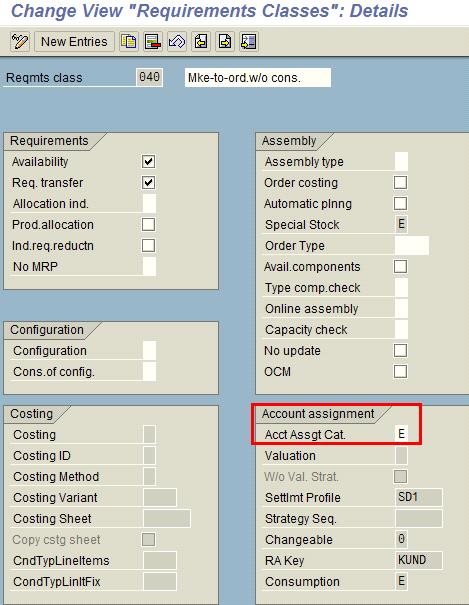
In our case, we have a make to order scenario-20, where by default, the account assignment for planned orders is « E ». i.e. sales order.—Normally this account assignment flows from Account assignment category defined in the Requirement Class. This Requirement class then assigned to Requirement type. This Requirement type is assigned to Strategy and this Strategy assigned Strategy group. Finally this strategy group is then linked to your material master.

For your case, I think this is coming from the Strategy Group 20.Check this by the following path:

1. Check the strategy assigned to strategy group 20 in T code OPPT or by path IMG -> Production -> Production Planning -> Demand Management -> Planned Independent Requirements ->Planning Strategy -> Define Strategy Group.

2. Then check which Requirement type is assigned to that Strategy in T Code OPPS or by path IMG -> Production -> Production Planning -> Demand Management -> Planned Independent Requirements -> Planning Strategy -> Define Strategy.

3. Now if this strategy you are using is 20 that is Make to order, then you will find settings for those Requirement type in Sales. For that you can take help from your SD consultant. Also providing you path for the same as below.

4. Check the assignment of Requirement class to requirement type in T Code OVZH or by path IMG -> Sales and Distribution -> Basic Functions -> Availability Check and Transfer of Requirements -> Transfer of Requirements -> Define Requirements Types.

5. At the end you have to check the settings and assignment of ‘Account Assignment Category’ for your Requirement Class in T Code OVZG or by path IMG -> Sales and Distribution -> Basic Functions -> Availability Check and Transfer of Requirements -> Transfer of Requirements -> Define Requirements Class.

6. Here check the ‘Account Assignment Category’ under ‘Account Assignment’ tab.

Requirement Class in T-code OVZG

Note:

Also, check the settings of Individual/coll. in MRP4 view for Semi-FG and Raw material in Material master.

Normally according to standard settings, it will be blank and you keep it as blank then it will take ‘Individual and collective requirements‘ which means it will take FG’s requirement. If You keep it as ‘1-Individual requirements only’ then it will take Individual requirement every time means it will be « E » for every requirement if your FG has « E ». And if you don’t want to follow the FG’s requirement plan then you have to keep it as ‘2-Collective requirements only‘.

See also
Production Order External Operation ProcessingGet help for your SAP PP Problems
SAP PP Forum – Do you have a SAP PP Question?SAP Production Planning Books
SAP PP Certification, Interview Questions and Configuration Books

SAP PP Tips
SAP PP Tips and Production Planning/Control Discussion Forum

Main Index
SAP Basis, ABAP Programming and Other IMG Stuff

All the site contents are Copyright © www.erpgreat.com and the content authors.
 
Publié dans PP

How to read order details from the liveCache with FM /SAPAPO/OM_ORDER_GET_DATA

http://scn.sap.com/docs/DOC-54254

How to read order details from the liveCache with FM /SAPAPO/OM_ORDER_GET_DATA

Very often when analyzing issues in APO I find it useful to read order details from the liveCache.

We can see from the order data stored in the liveCache when it was created, whether it was already transferred to ECC, what is the net processing times (in seconds) of the modes of the activities and, of course, compare all that information to the interactive screens we use all the time, be it Master Data (like PDS display) or application-specific (like Product View or a Planning Book).

One way to do this is by executing Function Module /SAPAPO/OM_ORDER_GET_DATA, as described below:

1) Get the OrderID number of the order.


At the Product View, execute ok-code GT_IO and then copy the value of the field Internal Order corresponding to the order you want to get the details on:

1_orderid.jpg

2_orderid.jpg


Another way would be to open the Order View (/SAPAPO/RRP2) for the order, then enable the debugger with ok-code /h and press enter twice to open the debugger. Then, copy the orderid from field GT_ORDERS[1]-ORDERID

3_orderid.jpg

4_orderid.jpg


2) Get the GUID of the Planning Version
(you can skip this step if you are reading order data from the Active Version / Planning Version 000).  


This can be done in transaction /SAPAPO/OM16. There, specify the name of the Model and the name of the Planning Version and execute. Then, copy the value of field Guid of Planning Vers.

5_plngversionguid.jpg

6_guidofplanningversion.jpg


3) Execute in transaction SE37 the Function Module /SAPAPO/OM_ORDER_GET_DATA.

At the selection screen of the transaction, specify the Function Module and click in Test/Execute button (F8)

7_functionmodule.jpg


On Test Function Module screen, set the indicator Uppercase/Lowercase

8_uppercaselowercase.jpg


In the Details View of Import Parameter IS_GEN_PARAMS, specify the GUID of the Planning Version (always 000 for the Active version)

9_is_gen_params.jpg

10_simversion.jpg


Press Back button. Then, in the Details View of IT_ORDER, specify the OrderID

11_it_orders.jpg

12_it_orders.jpg


Press back button and then execute the Function Module. Then, click on Save button in the popup and check the results:

13_execute.jpg

14_save.jpg

15_results.jpg


4) Analyze the data


  • You can check, for example, the date and time this order was created in APO, in export parameter ET_ORDERS, field CREATION_TIME (all dates are displayed in UTC, exactly as stored in the liveCache).
  • If you are in a scenario with alternative sequences, you can see in ET_MODES, field PROC_TIME, what is the net processing time of that mode, in seconds.
  • You can see the time-continuous and the bucket capacity requirement for each of the modes in ET_CAP_REQS.
  • In the example above, you can see this order was not sent over to ECC yet as ET_ORDMAPS is empty.
  • If there are activity relationships in the order, they will be shown in ET_INTERN_CONSTRAINTS.
  • Many other informations can be checked, if required, and then compared to the values displayed in interactive transaction (like the /SAPAPO/RRP3 or /SAPAPO/SDP94).
Publié dans APO

Ouvrir une période MM (pour les mouvements de stocks) MMPV

Transaction MMPV

Code société 

Période à ouvrir

Contrôler et déplacer

Autoriser qtés négatives dans période précédente

Autoriser valeurs négatives dans période précédente


Attention, n’avance que d’une seule période à la fois. Il faut la lancer plusieurs fois pour avancer de plusieurs mois.

Publié dans MM

Tips and techniques to smoothly and seamlessly transfer data between SAP APO and SAP ERP, leveraging the core interface (CIF)

Master Data Exits — SAP APO

Business Add-Ins (BAdIs) and customer exits

  • Exist for each publication type
  • Can be used to interrupt the program flow during the sending phase of direct and periodic sending

Master data exits

  • Inbound processing: Location — APOCF001 EXIT_/SAPAPO/SAPLCIF_LOC_001
  • Inbound processing: Resource — APOCF008  EXIT_/SAPAPO/SAPLCIF_RES_001
  • Inbound processing: Products — APOCF005   EXIT_/SAPAPO/SAPLCIF_PROD_001
  • Inbound processing: PPM — APOCF012   EXIT_/SAPAPO/SAPLCIF_PPM_001
  • BAdI: PPDS PDS — /SAPAPO/CURTO_CREATE
  • BAdI: SNP PDS — /SAPAPO/CURTO_SNP
  • Inbound processing: Source of supply — APOCF032EXIT_/SAPAPO/SAPLCIF_TPSRC_001

Transaction Data Exits — SAP APO

  • Inbound processing: Stock — APOCF011 EXIT_/SAPAPO/SAPLCIF_STOCK_001
  • Inbound processing: Production orders and planned orders — APOCF004 EXIT_/SAPAPO/SAPLCIF_ORD_001
  • Outbound processing: Production orders and planned orders — APOCF013 EXIT_/SAPAPO/SAPLCIF_ORD_002 (before send user exit)
  • Inbound processing: Purchase order documents — APOCF006 EXIT_/SAPAPO/SAPLCIF_PU_001
  • Inbound processing: Sales and distribution document — APOCF010 EXIT_/SAPAPO/SAPLCIF_SLS_001

SAP R/3 Exits

Customer exits in SAP R/3 for the publication types:

  • CIFORD03: Change Order Data
    • To change orders that are transferred from SAP APO to SAP R/3 in R/3 inbound queue
  • CIFORD01: Change Object Type and Order Data
    • To change order data that is transferred from SAP APO to SAP R/3 and is already in SAP R/3 format in R/3 inbound queue
  • PPAPO002: Influence Order Data after the Transfer from SAP APO
    • To influence the data that was transferred from SAP APO to SAP R/3 for a manufacturing order before it is transferred to the SAP R/3 manufacturing order
  • PPAPO008: Override Order Type for Planned Order Conversi on
    • To manually influence the order type of a manufacturing order generated by conversion from SAP APO (customer exit EXIT_SAPLCOXT_002)
  • PPAPO004: Re-Explode BOMs for Planned Order Conversion
    • To force the re-explosion of a BOM (customer exit EXIT_SAPLCOXT_001)
  • PPAPO009: Add Components and Items
    • To run own checks when components are added to a manufacturing order from SAP APO
  • PPAPO007: Override Checkbox Fields for Manufacturing Orders, SAP APO ® SAP R/3
    • To override checkbox fields for manufacturing orders on transfer from SAP APO to SAP R/3
  • Material master — CIFMAT01  EXIT_SAPLCMAT_001
    • To add new fields in the material master that are in SAP APO but not in SAP R/3 (for SAP R/3 to be the material master system of record, this user exit is necessary to add the new fields)
  • PDS transfer — CUSLNTRTO_ADDIN_SAP
    • To influence values and change fields on the PDS that are transferred to SAP APO from SAP R/3
  • CIFPUR01 (enhancement for the transmission of customer-specific purchase order fields)
    • To change purchasing data from purchase requisitions, POs, scheduling agreement schedule lines (OLTP scheduling agreement), and confirmations/shipping notifications (for SAP APO and OLTP scheduling agreements)
  • CIFPUR02 (enhancement PO interface — inbound)
    • To change PO data from SAP APO before a purchase req, scheduling agreement schedule line, or a PO is created in the OLTP system

Additional Exits

Customer exits for orders and manufacturing orders in SAP APO

  • APOCF020 — User-specific fields in the order interface (after posting in SAP liveCache or to the database)
  • APOCFPIP — Publication of in-house production orders (planned orders, manufacturing orders)

BAdIs

  • /SAPAPO/CL_EX_CIF_IP — Comparison of APO data and CIF data
    • To control if and when the activity dates planned in SAP APO should be rescheduled, or if a change to the order quantity in SAP R/3 leads to a proportional change to receipt and requirement quantities